Udyam Certificate Download & Print Online
Enter your Udyam Registration Number to verify, download and print your MSME/Udyam certificate no login required.
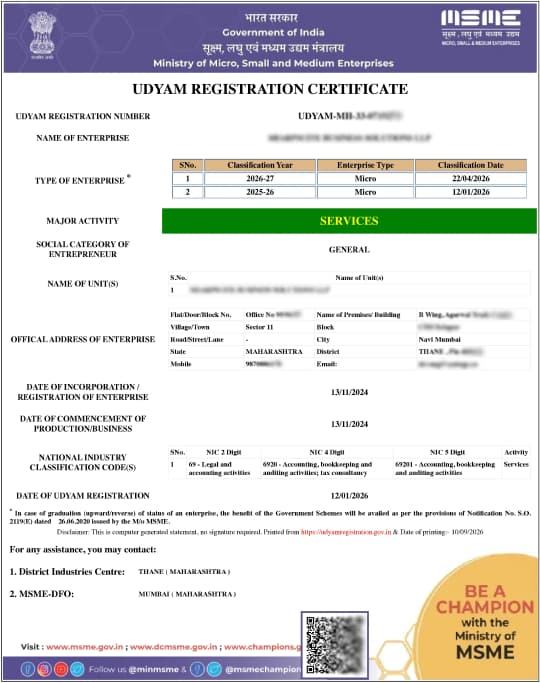
Sample Udyam Registration Certificate format, including the QR verification code displayed on every valid certificate.
Enter Your Udyam Details
Provide your 19-digit Udyam Registration Number and the mobile number registered on your Udyam or Udyog Aadhaar certificate.
Verify with OTP
Enter the 6-digit OTP sent to your mobile or email to confirm the request is genuinely yours.
Download & Print Your Certificate PDF
Your Udyam Registration Certificate opens as a high-resolution PDF — download it, save a copy, and print it directly from your browser.
How to Download & Print Your Udyam Certificate Online
A step-by-step facilitation guide for Indian enterprise owners to retrieve, download, and print their official MSME Udyam Registration Certificate. Whether you are accessing your certificate for the first time, require an immediate reprint, or need to verify active Udyam status, follow the procedure below.
What Is Udyam Certificate?
The Udyam Certificate is the official proof of MSME (Micro, Small & Medium Enterprise) registration issued by the Ministry of MSME, Government of India. It carries your 19-digit Udyam Registration Number (URN), enterprise name, category (micro/small/medium), Aadhaar and PAN-linked details, date of registration, and a QR code for verification. Once issued, it can be downloaded or reprinted at any time; there's no limit on how many times you retrieve a copy.
- •19-Digit URN: UDYAM-XX-00-0000000
- •Classification: Micro / Small / Medium
- •Verification: Aadhaar, PAN & QR Code
- •Reprint Limit: Unlimited lifetime access
Documents You Need Before You Start
Have the following details ready before requesting your OTP:
Udyam Registration Number (URN)
Your Udyam Registration Number (URN), in the format UDYAM-XX-00-0000000
Registered Mobile / Email
The mobile number or email registered at the time of Udyam registration
Access to Receive OTP
Access to that mobile/email to receive the OTP
No Document Upload Required: No Aadhaar card, PAN card, or other document upload is required to download or print an already-issued certificate; it is only required to register for the first time.
Step-by-Step: Downloading Your Udyam Certificate
Here's how to download Udyam Certificate in five simple steps. The same process covers how to download MSME Certificate, since both names refer to the same document:
- 1
Enter your Udyam Registration Number and registered mobile number in the form above.
- 2
Choose how to receive your OTP: SMS to your mobile or a code to your registered email.
- 3
Enter the 6-digit OTP within the time limit shown on screen.
- 4
View and download your certificate as a PDF once verification succeeds.
- 5
Save the PDF to your device or cloud storage so you have a backup copy for future use.
Step-by-Step: Printing Your Udyam Certificate
Ready to print Udyam Certificate? Follow these steps to get clear, properly aligned copy that you can keep for your business records and future reference.
- 1
Open the downloaded certificate PDF.
- 2
Press Ctrl+P (Windows/Linux) or Cmd+P (Mac), or use your PDF reader's print icon.
- 3
Select a printer and choose "Fit to page" so the QR code and borders aren't cut off.
- 4
Print and keep at least one physical copy with your business records.
- 5
Use the printed certificate when submitting business documents to banks, government offices, or other official authorities.
Lost Your Mobile Number or Can't Find Your Udyam Number?
If the mobile number linked to your Udyam registration is no longer active, use the email option instead if one was registered. If you don't have either, or don't know your Udyam Registration Number, that has to be recovered through the number-lookup/registration-support flow rather than this download tool.

Common Problems and Fixes
Quick solutions to frequent questions when retrieving or printing your official Udyam document:
| Problem | Fix |
|---|---|
| Udyam number not found | Recheck for extra spaces or a mistyped character; the format is always UDYAM-XX-00-0000000. |
| OTP not received | Confirm the number/email is still the one on file; check spam folders for email OTP; wait 60 seconds before requesting a resend. |
| PDF won't open | Update your PDF reader, or try downloading again on a different browser. |
| Certificate details look outdated | You'll need to update your Udyam record before re-downloading — the certificate always reflects the latest saved details. |
Why Keep Your Udyam Certificate Downloaded and Ready
Keep a downloaded copy on hand — banks, tender portals and GeM procurement listings routinely ask for it on the spot.
Collateral-Free Bank Loans
Show your downloaded Udyam certificate to any bank for CGTMSE-backed, collateral-free loans at preferential MSME interest rates.
Up to 50% Off Patent & Trademark Fees
A valid Udyam certificate cuts government fees for patent, trademark and industrial design applications by up to half.
Lower Electricity Tariffs
Many state electricity boards offer tariff concessions to enterprises that have a valid Udyam certificate.
Protection Against Delayed Payments
Your Udyam certificate is what MSME Samadhaan requires to claim compound interest from buyers who don't pay within 45 days.
Udyam Certificate, MSME Certificate & Udyog Aadhaar— What's the Difference?
If you searched Udyam Aadhar Download or Aadhar Udyam Download, here's what you actually need these three terms are often used interchangeably, but only one document is current.
If your certificate number starts with “UDYAM” you're in the right place; use the form above to download certificate.
Udyam Registration Certificate
This is currently valid document, issued since July 2020, identified by Udyam Registration Number in format UDYAM-XX-00-0000000.
MSME Certificate
This is common name people use for Udyam Registration Certificate; both terms refer to same document
Udyog Aadhaar Memorandum (UAM)
This is old MSME registration system, phased out in 2020. If your certificate says 'UAM' instead of 'UDYAM', it needs to be migrated to Udyam
Frequently Asked Questions & Facilitation Guidelines
Find quick solutions to common queries about your enterprise registration number, certificate re-downloads, and our dedicated agent support.